

Greetings friends! Linux is 35 years old. Imagine that! Announced on August 25th, 1991, it has become a mainstay for servers and many other kinds of technologies. I shudder to think what life would be like without it.
All right then. In September we're back with a brand new webinar:
Hands-On Linux Networking & Security
September 22nd & 23rd, 10am ET - Hosted by O'Reilly
Chock full of new Linux labs
Register HERE!

Be there or be square (and actually, its perfectly okay to be both!)
Linux dominates the server market, and by some estimates has now achieved 10% of the desktop market—in some parts of the world at least. And they said it couldn't be done. 244K+ stars on GitHub, and we're now up to mainline kernel version 7.2.
Impressive.
Latest Post
 Dave Prowse
News of Note - August, 2026
- As mentioned—Linux is 35 years old! How old are you? I suppose we could define time based on Linux. Were you born in the pre- or post-Linux era? 😀
Either way, it's a gift! - Ubuntu 26.04.1 LTS: Released August 27, 2026. This is the major point release that many organizations wait for before upgrading to a new version of Ubuntu.
But actually, if you were already running Ubuntu 26.04, your updates over the past week or two probably got you to 26.04.1 before, but now it is officially available as a full .iso image at https://ubuntu.com/download/desktop.
(Same goes for the server version.) - Linux kernel 7.2: Released on August 16. Major highlights include:
- Cache-aware load balancing
- A "Fairer" GPU scheduler
- Initial HDMI 2.1 FRL support for AMD GPUs
- Rust support expanded to the IBM S/390 architectures
- The Linux Foundation has been busy:
- Launched the TRACE standard: an open, hardware-backed runtime evidence specification. Link
- Launched the Tokenomics Foundation to govern open-source standards tracking the cost and ROI of corporate AI implementations. Link
- Released their official schedule for the Open Source Summit in Prague (October 7-9). Link
- Fedora 45 systemd debacle: Developers are debating (once again) the boundaries of the OS and the user environment. The latest comes in the form of
systemd.environment-generatorwhich is designed to natively manage per-user env vars across the entire distribution. Also, console migration and bootloader debates. It will be interesting to see where everything lands for Fedora 45 (which is slated to ship October 20, 2026). - Security Vulnerabilities: Dirty Clone (CVE-2026-43503), pedit COW (CVE-2026-46331), Remote Direct Memory Access overrun (Link to article), and the Secure Boot trust Crisis continues (several foundational master authority certificates expiring, and so hundreds of millions of Linux machines required coordinated updates to their firmware databases) Link to article.
Monthly Troubleshooting & Configuration

Debian Sid Update (Aug, 2026) and GNOME 50
On Monday, August 24th I did my weekly Debian Sid update on my test system. Normally, the following works fine:
sudo apt update && sudo apt upgrade -yHowever, the typical upgrade was not enough for the latest updates to Sid. It would update the repositories, but would not install anything, showing that 399 packages were not going to be installed. If this happens, it is normally because packages are being held back, and the standard apt upgrade will not install or remove dependencies.
To make it work, this required a full-upgrade instead this time. So the full command was:
sudo apt update && sudo apt full-upgrade -ysudo apt --fix-broken installI tried this first, but to no avail, because nothing was broken on the system. (Well... as far as I know!)
This command worked and installed the 399 packages. However, when it got to the part where it asked which display I wanted it said that lightdm was the default. That was not the case, so I had to specifically select gdm3 (GNOME) because that is what I use on that system.
Then, I ran a couple of standard commands:
sudo apt autoremove
sudo apt autoclean
...and rebooted. Everything looks good. And indeed, GNOME was updated from the previous 49.5 to 50.4. Interestingly enough, my extension Draw On Gnome still works properly. Previous tests for GNOME 50 showed that the earlier version of the extension wouldn't work with 50.0 and 50.1—now it does with 50.4!
Anyways, After doing another apt update it shows another 79 packages available, but cannot be installed with apt upgrade or apt full-upgrade. (Debian Sid does these types of things...) This is probably due to a library transition. apt tends to land on the safe side of things. So, I tried with the aptitude program. A sudo aptitude safe-upgrade would not install the other packages. A sudo aptitude full-upgrade would do it, but it required that the system download an unstable version of libpeas. Doing a full upgrade with aptitude can be dangerous, so I checked to make sure there were no security advisories with the packages it wanted to download. Currently there were none so I initiated the full-upgrade (I'm running Debian Sid after all!) It seems to have gone through properly, but you have to be very careful when installing dependencies that apt tries to avoid. It could easily break packages, GNOME, or the entire system!
However, the following commands ran clean:
systemctl status
    # showed the system was running properly and no service errors
sudo apt-get check
    # no errors, clean
sudo dpkg --audit
    # no errors, clean
So the system looks good, and I'm happy to be using GNOME version 50 on Debian Sid! Of course, GNOME 50 (on Debian) does away with X11 sessions—it's Wayland only now, and as the default, as the following command shows:
> echo $XDG_SESSION_TYPE
wayland
It's the way of the future!
Goodbye to NoMachine (rant)
Well, I've used NoMachine to control remote systems in my lab for a decade. It was free... it was awesome... Now, it costs money. Version 10 now costs $24.95 per year. Not a huge amount of money, but not the kind of money I want to spend. And not the type of thing I will recommend to any of my readers. So it's on to RustDesk as the replacement. (btw, GNOME RDP is making great strides as well.)
Why, you ask? Well, most Linux systems are moving toward Wayland sessions only and are ditching X11. For example, if you use GNOME version 50 or higher as your desktop, then it is Wayland only. Fedora 44, Ubuntu 26.04, Arch, and now Debian Sid have all embraced GNOME 50—and therefore Wayland. The problem is that NoMachine version 9 has issues with Wayland. Version 10 of NoMachine of course does support Wayland out-of-the-box, but as mentioned, now costs $24.95 - for the personal edition!
sudo /etc/NX/nxserver --eglcapture yesWe could go on and on hacking away to make NoMachine version 9 work...
... but it doesn't matter, I'll probably have to upgrade to version 10 for one reason or another in the future... and that... costs $24.95. And that, is not happening.
Historically, the company's claim to fame was that the personal edition was free, and enterprise editions are where they made their money. I personally have recommended the enterprise edition to several clients, and the personal edition to numerous students and associates. This system worked well for NoMachine and worked well for individual users. IMO, that's how it should have stayed.
But perhaps this was a sign. I should have put my weight behind the open-source RustDesk a long time ago. It's based on the AGPL license and has free local software and free self-hosted software. Plus, it runs on a lot of platforms. You can also pay the company for Pro plans, but they are not necessary—especially for a person like me who is just using it in the lab. Can this change in the future? Perhaps, but unlikely with the AGPL open-source license. So it's on to custom configurations of RustDesk in my lab!
AI Contemplation - Part IV
I continue to focus on open-weight AI models. Things that we can run locally. I'm sticking with the prediction that in a few years' time, we will be able to do just about anything with localized, open-source AI tools that currently can only be done with big corporate tools—and we'll be able to do it on typical computers with a decent GPU—and without too much fuss.
In the following two sections I'll talk a little about AI assistant testing that I am doing locally on Linux and also my observations about Claude uptime.
AI Assistant Testing
At work I'm testing with open-source, non-invasive AI assistant tools that will (hopefully) aid in developing, planning, and creating foundational code and media.
(All within Linux, of course.) I'm very excited about it and perhaps a little apprehensive as well.
The goals are to:
- Build a working, stable AI assistant that is secure, and uses no telemetry.
- Allow for communication with said AI assistant via typing or voice (in both directions).
- Pair programming within VSCodium and in the terminal.
- Web-based chat access.
- Runs locally. Virtually zero reliance on corporate data centers.
The target system is my backup PC. Specs are: Core i7 5820, 32 GB RAM, GTX 970 GPU (4 GB VRAM), and Debian Sid. Due to the age/power of the system (especially the video card), my options for models will be limited. But it will be a good test case and potentially helpful to people with older systems. I'll build on these tests later on my main system.
Some of the tools I am testing with include: Ollama, Phi-4 Mini and Qwen2.5 models, whisper.cpp, Piper, OpenCode, Aider, and Open WebUI. Also, ComfyUI and Stable Diffusion for creating images, diagrams, and illustrations. Every tool opens the door to potential security vulnerabilities and potential conflicts with other software, so I am moving slowly through this process—as I mentioned, I'm an apprehensive kind of guy!
Claude is down way too often (rant)
Take a look at this uptime chart from status.claude.com. Focus in on the consumer-based tools.
(snapshot from August 28th, 2026)
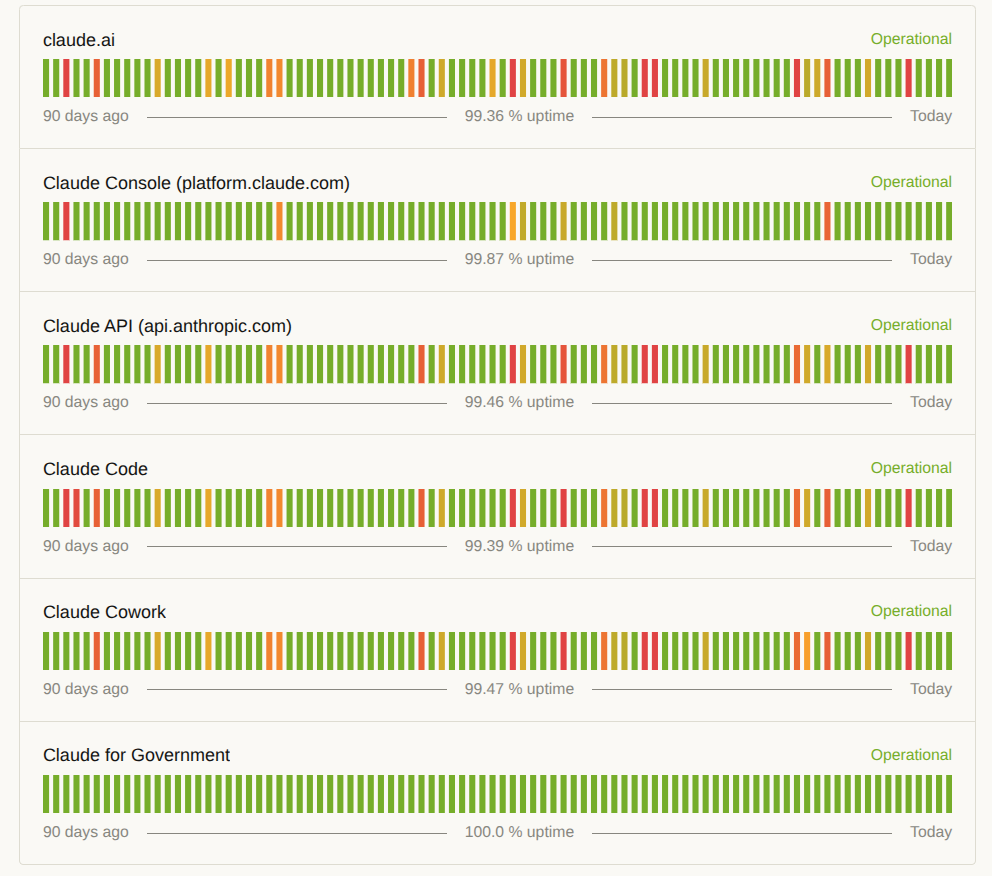
To me, that's a lot of red! Just for comparison, if I ever ran a webserver with anything less than 99.9% uptime, I'd be looking for new work. I know, I know, apples to oranges. But should it be? Take a look at Claude for Government—100% uptime over the last 90 days. While it is true that government-based Claude has isolated infrastructure, strict SLAs, and slower deployments, it still doesn't remove the foul taste in many commercial developers' mouths—the feeling that they are "beta testers". The taste gets worse when we realize that hard drive and RAM prices (and plenty of other tech) have gone through the roof due to AI data center purchases. But I digress!
While the numbers are not good in the first place, I was getting the feeling that they are padded. Time to investigate. Just running some basic math based on their chart for the last 30 days, and I'm showing 98.33% uptime. And that's a conservative estimate. Add to that the fact that claude.ai is often non-responsive for a variety of reasons that don't even make it to their status chart. For example, I still use Claude for a JavaScript project, and according to my notes, it's happened to me 13 times this year. It simply stops working or becomes hallucinatory to the point where it is unusable (even with higher-level models or effort levels)—and these episodes were under-reported, or not reported at all. For me as a user, that brings the uptime % down even further - more like 90 to 95%, maybe less.
Moreover, these downtime incidents almost always happen during business hours (9am-5pm). During the time that WE ARE DOING WORK! So, when you think about it, the practical numbers are even worse. There are plenty of developers who burn the midnight oil, but for the majority of the people, having great uptime at 9pm or 3am is not important. Ultimately, it makes the "real" uptime % a far lower number.
There's a guy who I used to work with who liked to say: "It's all bullshit." While I worry that statements like these are tantamount to shaking your fist at the clouds, I can't escape the feeling that it is 100% spot on in this case.
Nonsensical Image of the Month
As I was writing this newsletter, Google Gemini hit me with this response to a heavy-duty math question:

But it continued to display this when faced with typical, basic prompts, leading me to believe that it wasn't the math! I'm sure many of you have seen this as well. It just shows that no platform can have 100% uptime.
When it comes to your project, sometimes you have to be selfish! The relentless pursuit of your goal! Uncompromising. Whatever it is that you want - go get it!
As always, yours,
Dave


